 Sol
SolFeatures
Why I Built Sol
Sol is built for normal browsing just like other browsers, without draining your computer's resources, while staying aesthetic, beautiful, and premium.
It started as a personal tool I built for myself. Because I work on the web all day, I kept wondering why other browsers eat so much RAM, stutter on pages with heavy animations, and eventually freeze or crash when multiple tabs stay open. I built Sol to cut memory usage down to a fraction while keeping a polished, modern interface.

How Sol stays this light
Instead of bundling a redundant 300 MB Chromium binary and spawning twenty background helper processes, Sol pairs a lean native host with Windows' shared WebView2 engine. Inactive tabs sleep and release their memory completely until you click them again.
Built-in ad blocking with uBlock Origin Lite
Ads and tracking scripts are one of the biggest reasons web pages lag and eat RAM. Sol ships with uBlock Origin Lite enabled by default, blocking third-party ad payloads before they execute.
Native Video Downloader
Downloading a video or audio stream normally means using ad-filled converter sites or installing third-party extensions that run continuous background scripts.
Sol builds media detection and multi-quality downloads directly into the browser. When a video plays on any website, Sol detects the media stream automatically and displays a download button right in the top bar.
Built-in download engine
- Automatic stream detection: captures direct MP4, WebM, HLS (.m3u8), and DASH (.mpd) streams as they load in the page
- Quality selector: pick your resolution from 480p and 720p up to 1080p, 4K, and 8K, with options to save video or extract audio directly
- Segmented HTTP range downloader: downloads files in parallel chunks for maximum transfer speed, with full support for pause and resume
- Integrated helper engine: includes verified yt-dlp and FFmpeg binaries to merge separate video and audio streams locally without extra configuration
- Floating download cards: manage active downloads with pause, resume, cancel, and direct file open in Explorer without intrusive dialogs
Contextual Action Fan
Traditional browser context menus are long, rectangular lists with twenty identical rows. Finding the action you want requires reading through items you never click.
Sol replaces standard right-click menus with a radial Action Fan built with fluid spring physics. It fans out around your cursor with only the actions that match what you clicked.
Adaptive radial actions
- On empty page areas: quick actions to navigate back, forward, reload, toggle Split View, or open the Design Inspector
- On text selections: one-click copy, web search, in-page translation, or save selection to Quick Notes
- On images and media: copy image, save to disk, inspect dimensions, or open directly in a clean tab
- On links: open a navigable preview, open in a new tab or Split View, and use More for copying the link or saving it to a note
- Spring-driven interaction: opens with natural momentum and closes cleanly when you release or click outside
Isolated Site Sessions
Most browsers share cookies and login tokens across every tab. When you need to test a web application as an administrator and as a standard user at the same time, you have to open private windows, launch secondary browsers, or constantly log out and log back in.
Sol builds native session isolation directly into tabs and domains. You can assign distinct session profiles (Admin, User, Guest, or custom names) to any tab or site.
Multiple accounts in one window
- Independent storage: each session profile runs with completely isolated cookies, local storage, session storage, and authentication tokens
- Simultaneous logins: stay signed into two or three different accounts on GitHub, AWS, Google, or your local web app in the same window
- Domain session rules: bind specific URLs or domains to a designated session profile so they always launch with the right account automatically
- Seamless auth flows: OAuth and SAML sign-in redirects resolve cleanly within their assigned session without leaking authentication state to other tabs
Developer & Design Tools
In standard browsers, responsive mode only resizes the page into a flat rectangular box of pixels. If you want realistic device frames or side-by-side device previews, you have to install third-party extensions that add memory overhead.
Sol builds device frames, inspection tools, and network diagnostics directly into the host, with zero extensions required:
Native developer tools
- Real device mockups: preview any site inside actual phone (iPhone), tablet (iPad), laptop (MacBook), or desktop (iMac) frames, and rotate between portrait and landscape in one click
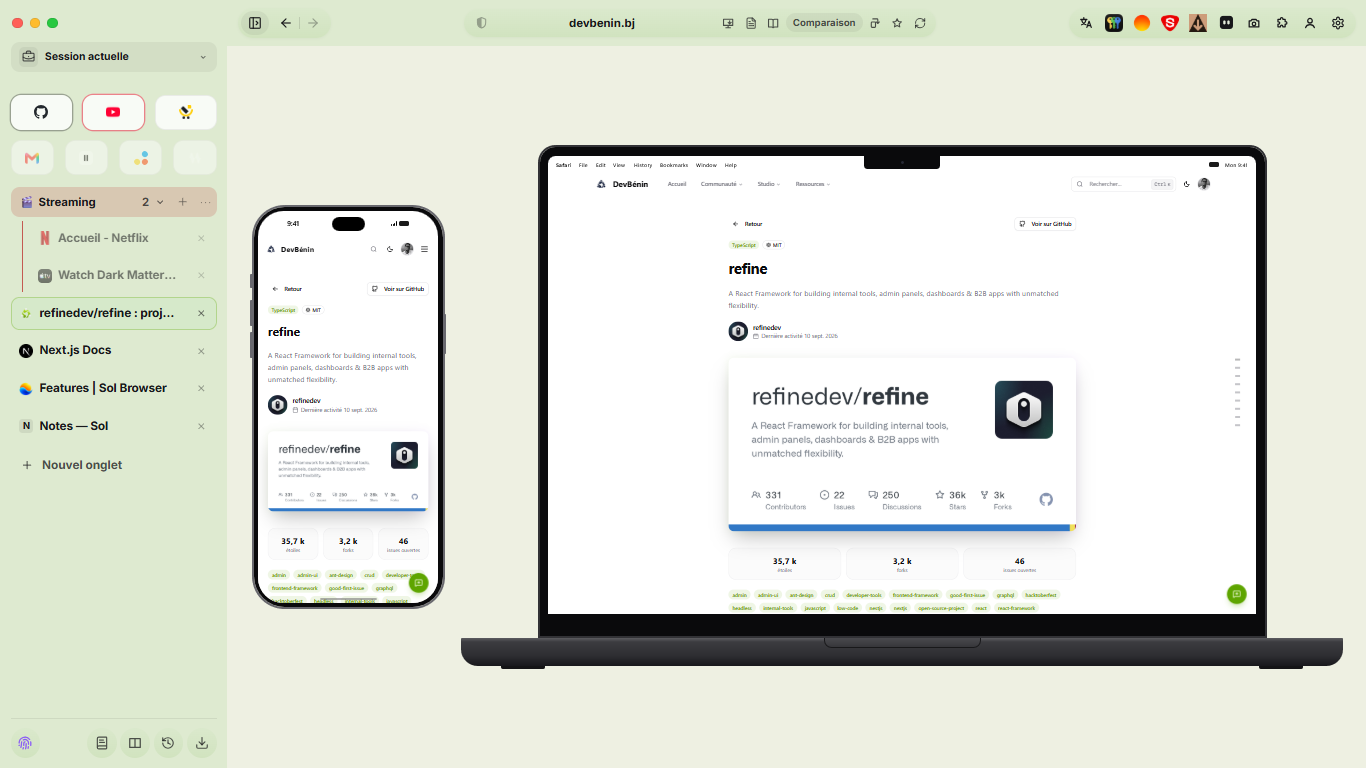
- Compare Screens: inspect your site on phone, tablet, and desktop mockups side by side in the same view to evaluate responsive breakpoints in one pass
- In-page Design & CSS Inspector: press Alt or Shift and hover any element to see its font family, size, weight, line-height, letter-spacing, padding, margin, colors, and WCAG contrast ratio in a floating pill, with one-click CSS copying
- Lightweight Network Panel: bottom drawer that filters live requests by All, API (XHR and Fetch), or Errors, with formatted JSON request and response bodies
- Built-in Screen Capture: grab a selected region, the visible viewport, or the full scrolling page, with an option to include the browser frame and mockups
- Split View: place two tabs side by side (50/50, 1/3, 2/3, or free drag) to test your local build right next to documentation or API specs
Everyday Polish & Notes
Moving to Sol does not force you to relearn how to browse. You keep standard keyboard shortcuts, familiar navigation habits, and full support for Chrome Web Store extensions.
On first launch, Sol detects browsers already installed on your PC and imports your bookmarks, browsing history, and saved passwords in one click.
Built-in Quick Notes
Sol includes a built-in notes workspace (start.sol/#notes) and sidebar drawer where you can jot down thoughts, links, to-do items, or code snippets while you browse. Notes are saved locally with your profile, stay accessible offline, and export cleanly to markdown.
Distraction-free Reader Mode & Translation
Click the Reader icon on noisy blogs or documentation to strip away cookie banners, ads, and distracting layouts in favor of clean typography. Sol also includes native in-page translation and uses Windows' system spell-check engine directly.
Everyday details and comfort
- Dynamic color adaptation: in Default theme mode, Sol samples the background and accent color of the website you are visiting and tints the floating top bar, vertical sidebar, and rounded corners so the interface blends into the page
- Start page wallpapers and typography: curated Unsplash photography with daily rotation, personal image upload, and 11 interface typography choices
- Progressive Web App (PWA) detection: Sol recognizes installable web apps and offers one-click desktop app creation with standalone window framing
- Graduated memory management: inactive tabs sleep after 30 seconds, 1 minute, or 5 minutes, while safe unloading protects active forms, media playback, and active downloads
- Collapsible Tab Groups with custom colors and icons: collapse a group when switching tasks to free memory immediately
- Floating interface: every menu, download card, and popup floats with rounded geometry, and the vertical sidebar hides anytime for edge-to-edge reading
- Automatic Picture-in-Picture: video continues playing in a floating mini-player the moment you switch tabs
For Web Developers
Build, compare and debug directly in Sol. Open the device menu, Network panel or command palette to get started.
- Synchronized interactions across Device Mockups: scroll, click, type in forms, or toggle dark mode on one frame in Compare Screens and watch phone, tablet, and desktop mockups mirror your actions simultaneously
- API Request Replay & Response Mocking: edit JSON payloads or force 401/500 status codes in the Network panel to test error handling without touching your backend
- Localhost LAN QR Preview: generate a quick QR code from the address bar to test your local development server on a physical phone over Wi-Fi in seconds
- Workspace Snapshots: save a named set of open tabs, split views, and device mockups and restore the entire layout in a single click, alongside your current tabs
Coming Soon
Sol is actively evolving. We are building practical native tools for everyday browsing and web development, designed with the same rule as the rest of the browser: zero memory cost when idle.
For Everyday Browsing
- Smart Price & Restock Watcher: select a price on any store page and receive a quiet notification when it drops or returns to stock
- Local File Converter & OCR in Downloads: convert WebP images to PNG, compress PDFs, or copy text from screenshots locally without uploading files to third-party converter sites
- Audio Read-Aloud for Reader Mode: listen to long articles, documentation, or recipes read aloud in the background while working on other tasks
- Tab Archive & Auto-Tidy: automatically organize older tabs by project or topic into sleeping archives that consume zero memory
Follow the Roadmap
New builds ship regularly. You can inspect latest updates or suggest improvements on our GitLab Releases page.
Demos in Action
Real captures of Sol Browser running on Windows: inspecting responsive layouts side by side inside native device mockups, and detecting video streams on the fly with the built-in downloader.
1. Multi-Device Compare Screens
Previewing a web application across mobile and desktop breakpoints in a single view. Sol renders the page live inside phone (iPhone) and laptop (MacBook) frames side by side, and automatically samples the site's background color to tint the browser chrome.
2. Native Video Downloader
Capturing a video stream directly from YouTube without third-party extensions or converter websites. Sol detects active media streams, opens a quality selector from 1080p down to 144p and audio, and downloads the file through a floating progress card with pause and resume.